Bitget Referral Code and Link: Quest rewards: airdrops and a Mystery Box up to $1,000
Under Bitget referral code S6EVMAZY a new account receives quest rewards: airdrops and a Mystery Box. The reward size depends on your trading volume, and there is no trading fee discount under this code — the exchange gives bonuses rather than a lower rate. Referral terms may change over time and vary by your jurisdiction — always check the current rules on the exchange’s own site.
This site contains advertising. We receive a commission if you sign up for an exchange through our links, at no additional cost to you. Learn more
What the Bitget referral code gives
We do not state a percentage: Bitget does not declare one, and the size of the rewards depends on your trading volume and activity. The final reward set is visible in the sign-up form before you confirm the account. Registration from Russia is open, verification is available and P2P with rubles works.
- Rewards are credited to the rewards hub rather than as a lower rate.
- Rewards have an expiry date — activate them after registering.
- Terms are locked at the moment of registration — check them in the form before confirming.
- Registration from Russia is open, P2P with rubles is available.
How to enter the Bitget referral code during registration
- Follow the link with the referral code — the code is filled into the form automatically.
- If the “referral code” / “invite code” field is empty, copy the code on this page and paste it manually.
- Make sure the field contains exactly the code you copied: it cannot be changed after the account is created.
- Complete the registration and, if required, pass verification (KYC).
What the Bitget referral code field looks like
Screenshots show what the exact Bitget referral code gives: the terms and the label under the field are displayed right in the Bitget sign-up form.
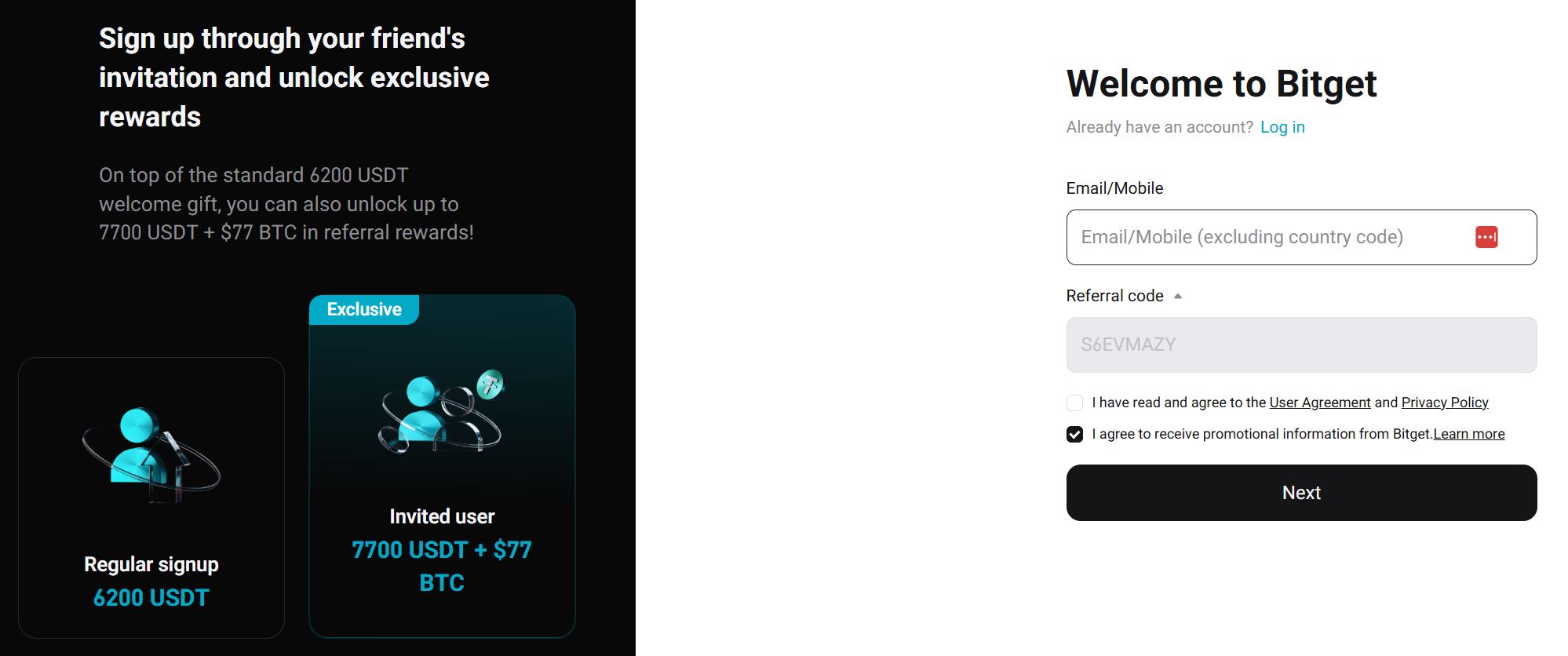
Can the Bitget referral code be entered after registration
No. The Bitget referral code is accepted only at the moment the account is created — in the sign-up form or inside the link you follow. If the account already exists without a code, it cannot be linked retroactively: support does not handle such requests. The only working option is a new account via a link with the code, but most exchanges allow one account per user, so creating a second one just for a discount is not worth it.
Registering on Bitget with or without a referral code
Registering on Bitget with a referral code is not mandatory — without it the account is created on standard terms. A code makes sense if you plan to trade: with a monthly turnover of several thousand USDT or more, a lower rate or a fee rebate produces noticeable savings. If you need the account only for a withdrawal or for holding funds, the code brings no benefit.
Referral code savings calculator
Enter your daily turnover and market — the calculator shows the rate without a code, the rate with a code, and the daily, monthly and yearly savings for Bitget and other exchanges.
| Exchange | Code | Rate without the code | Rate with the code | Savings / day | Savings / month | Savings / year | Sign-up link |
|---|---|---|---|---|---|---|---|
| Binance | 0.1% | 0.09% | 10.00 USDT | 300 USDT | 3,650 USDT | Sign up with the code | |
| Bybit | 0.1% | 0.1% | — | — | — | Sign up with the code | |
| OKX | 0.15% | 0.12% | 30.00 USDT | 900 USDT | 10,950 USDT | Sign up with the code | |
| Gate | 0.2% | 0.16% | 40.00 USDT | 1,200 USDT | 14,600 USDT | Sign up with the code | |
| Bitget | 0.1% | 0.1% | — | — | — | Sign up with the code | |
| KuCoin rebate | 0.1% | 0.1% · fee rebate 20% | 20.00 USDT | 600 USDT | 7,300 USDT | Sign up with the code | |
| HTX rebate | 0.2% | 0.2% · fee rebate 10% | 20.00 USDT | 600 USDT | 7,300 USDT | Sign up with the code | |
| BingX | 0.1% | 0.1% | — | — | — | Sign up with the code | |
| LBank | 0.1% | 0.085% | 15.00 USDT | 450 USDT | 5,475 USDT | Sign up with the code | |
| Hyperliquid | — | 0.07% | 0.07% | — | — | — | — |
| Toobit rebate | 0% | 0% · fee rebate 5% | — | — | — | Sign up with the code | |
| MEXC rebate | 0% | 0% · fee rebate 20% | — | — | — | Sign up with the code | |
| No savings found for these settings on any exchange. | |||||||
The calculation is approximate.
What to know about referral codes
- A code works only for new accounts. It cannot be applied to an existing account.
- Promo terms change: the exchange may adjust the discount size or end the campaign. Current terms are always shown during registration and in your account.
- The offer applies to trading fees and does not remove withdrawal, network or payment-provider fees.
Frequently Asked Questions (FAQ)
The exchange does not publish a fixed percentage: this code grants quest rewards rather than a fee discount. The reward size depends on the campaign, your trading volume and your region and is shown in the sign-up form — we avoid quoting a remembered figure so as not to mislead you.
Yes: the code does not make the terms worse, and the sign-up form shows the final offer before the account is created. If the offer does not suit you, simply close the form.